
The accessibility assistant
your team will actually use
AI chat, automated scanning, code remediations, alt text generation, behavioral tests, screen reader simulation, and full compliance reporting, all in one app.
Train AllyUp on your organization, upload your design DNA
Generic AI gives generic answers. When you load your design system, component library, and brand guidelines into AllyUp's knowledge base, and configure your AI Organisation Profile, every answer shifts from textbook WCAG to advice that knows your specific components, tokens, and conventions.
Persistent knowledge base
Upload design tokens, Figma exports, style dictionaries, component docs, or internal guidelines. AllyUp stores them as permanent context, available in every chat session and scan.
AI Organisation Profile
Write instructions in a full markdown editor that define how AllyUp should behave for your organisation. Your client name auto-substitutes throughout every response. Load the expert-crafted default prompt and customise it, or drag and drop your own .md or .txt file. Preview in rendered markdown before saving.
Token-level WCAG audit
AllyUp reads your design token file and tests every color pair against WCAG contrast ratios. You get a report by token name, not by hex value, so designers and developers both know exactly what to fix.
Ten focus modes, one for every role on your team
Switch the AI lens before you ask. Each mode enforces a different output structure, persona, and scope, so developers get code, QA gets Playwright scripts, and content editors get plain-language guidance. No role receives advice meant for someone else.
All
Accessibility Champions & Leads
Cross-functional overview across all disciplines in one response: Executive Summary, Evaluation, Barrier, Code Fix, Why It Matters, and Definition of Done. The default for open-ended questions.
Requirements
Product Managers & Business Analysts
Frames answers around business logic and accessibility obligations (EAA, Section 508, ADA Title III) before any design or code exists. Identifies what needs to be true at the start of the sprint. Five constraints analysed, clear acceptance criteria, no design assumptions.
Design
UI/Visual Designers
Focuses on colour contrast, spacing, typography, and visible focus indicators. References your design tokens. Applies the 60-30-10 colour rule and 8-Point Grid. Never outputs code. Pure design deliverables and Figma guidance only.
UX
UX Designers & Researchers
Applies Fitts Law, Hick Law, and Miller Law to flag interaction barriers. Covers cognitive load, keyboard navigation flows, and how assistive technology users experience your product.
Development
Front-end Developers
Outputs the exact HTML, React, or CSS fix. Provides semantic markup, ARIA patterns, keyboard event handlers, and copy-pasteable code. Every response includes a Playwright verification snippet.
QA
QA Engineers & Testers
Generates Playwright automation scripts, screen reader testing matrices for NVDA/JAWS/VoiceOver, and keyboard navigation heuristics. Structured with the AAA test pattern and CI/CD integration guidance.
Content/Editor
Writers, Editors & CMS Teams
Plain-language guidance for non-technical content producers. Covers alt text quality, link label clarity, reading level (WCAG 3.1.5), heading structure in rich-text editors, and caption requirements. No code.
Documents/PDF
Document Producers & Remediators
Drag a PDF into chat for a full accessibility scan, then ask role-specific remediation questions. Covers PDF/UA (ISO 14289), EN 301 549 Chapter 10, Acrobat Pro workflows, PAC 2024 validation, and EAA Annex I document scope.
Cognitive
UX Researchers & Cognitive Accessibility Specialists
Addresses cognitive load, reading complexity, and predictable interactions. Applies WCAG criteria on timing, error recovery, and plain language. Flags memory-intensive flows and distraction risks. No code.
Mobile
Mobile Developers & QA Engineers
Covers touch target sizing, gesture alternatives, mobile screen readers (TalkBack and VoiceOver), orientation constraints, and responsive layout failures. Maps issues to WCAG mobile techniques and EN 301 549 clause 11.
Thirty-eight ways AllyUp saves your team time

AI Accessibility Chat
Ask any question about WCAG 2.2, EAA, Section 508, ADA Title III, EN 301 549, ARIA, colour contrast, keyboard navigation, or your design system. Get a precise, standard-grounded answer in seconds, for any role on your team. Switch between Quick answers for a fast, to-the-point reply and Full answers for an in-depth, example-rich response.

Design System & Token Audit
Upload your design system, Figma exports, style dictionary, or component library as AllyUp's knowledge base. Every answer shifts from generic WCAG to advice specific to your actual tokens, your component names, your brand conventions. AllyUp also audits your token pairs directly against WCAG contrast ratios, so you see exactly which design decisions fail.

AI Organisation Profile
Write an AI Organisation Profile that defines how AllyUp should behave for your organization. Set its tone, scope, and priorities. Your team gets answers from an AI that understands your design conventions and speaks in your organization's voice.
Accessibility-Graded Component Library
Browse a curated catalogue of UI component libraries with accessibility grades, or add your own by name, version, and docs URL. AllyUp pulls the right component into its AI fixes, so generated code matches the library your team actually ships.

Organisations & Team Workspaces
Create an organisation and bring your whole team into one shared workspace. Your knowledge base, AI Organisation Profile, component library, scans, and reports all live at the organisation level, so everyone works from the same context and the same audit trail. Belong to more than one organisation and switch between them in a click.

Teammate Invitations & Roles
Invite teammates by email and assign owner, admin, or member roles. Owners and admins configure settings and manage members, while members get view access to the knowledge base, AI Organisation Profile, and component library. Accept or decline invitations from your in-app inbox, and leave an organisation whenever you choose.

Quick & Full Scan Modes
Run a Quick Scan (automated violations only) for fast results, or a Full Scan (all five phases) for a complete picture including behavioral tests, AI narrative, and a manual checklist.

Multi-Page Crawl & Linked PDFs
Scan a page and the pages it links to in one run. From your entry URL, AllyUp finds and scans up to 4 linked pages plus up to 8 linked PDFs, each saved as its own report. Crawled pages run in Quick mode so one run stays inside its time budget, and you can deep-scan any of them afterwards from Reports. The crawl respects the target site's robots.txt, and on a large site it stops when the time budget runs out and tells you how many pages it did not reach.
PDF Accessibility Scanner
Drop a PDF into chat and AllyUp runs a full accessibility scan: tag structure, headings, tables, lists, form labels, alt text, language, title, and bookmarks. Results persist as a report with compare, trends, and a fix-plan generator. Maps to PDF/UA (ISO 14289) and EN 301 549 Chapter 10.

Global Compliance & Statement Wizard
Get AI guidance on your European Accessibility Act, Section 508, and ADA Title III obligations by sector and product type. When you're ready, a built-in 4-step wizard generates a compliant accessibility statement that links the applicable standards and names the relevant enforcement authorities, ready to publish for EU or US markets. A completeness checklist confirms every required section is present before you publish, while the same compliance workspace tracks known limitations with target remediation dates and records Annex VI disproportionate-burden assessments.
EN 301 549 Scan Standard
Switch to EN 301 549 mode and every violation card shows the corresponding Chapter 9 clause number (9.x.x.x) alongside the WCAG badge. An EN 301 549 Conformance Overview explains which chapters apply to web content, and the EAA Statement Wizard generates a conformance statement that references your EN 301 549 level directly.
Section 508 & ADA Title III Risk Indicator
Switch your scan standard to Section 508 (US Federal) and every report gains an ADA Risk Overview showing which violations are High, Medium, or Low litigation risk under ADA Title III. Coloured risk badges appear on each violation card and filter pills let you prioritise the issues most commonly cited in US accessibility lawsuits.

RGAA 4.1.2 Scan Standard
For French-market compliance, AllyUp scans against RGAA 4.1.2, reporting by all 13 RGAA themes and generating a ready-to-file Déclaration d'accessibilité template.

WCAG 2.2 Behavioral Tests
A dedicated tab inside Scans that drives real browsers against your URLs to test the six new-in-WCAG-2.2 success criteria static scans cannot reach: Focus Not Obscured (2.4.11), Dragging Movements (2.5.7), Target Size (2.5.8), Consistent Help (3.2.6), Redundant Entry (3.3.7), and Accessible Authentication (3.3.8). Run from the cloud or locally, scan many routes from one base URL, auto-dismiss cookie banners before testing, and review per-route Playwright screenshots, pass-rate scores, run-vs-run diffs, saved Profiles, Recent runs, trends, and a 30-day soft-delete trash.
In-Context WCAG Rule Explainer
Every violation card has an Open in Chat link. Click it and AllyUp creates a pre-loaded chat session with why the rule matters, how to fix it, and code examples drawn from what actually failed on your page, no external reference needed. A chat opened this way also offers four follow-up questions built from the finding itself, including one that invites you to challenge the result, so they are instant and spend no credits, plus a Return to scan issue button that puts you back on the finding you left. Open in Chat again and the same conversation reopens rather than starting over.
Public Rule Guidance Library
Every rule AllyUp checks has its own guidance page, 120 in all, covering what it checks, why it matters, how AllyUp tests it, how to fix it, and a failing and a passing code example. Browse them by the part of a page they apply to, Images, Forms and labels, ARIA, Tables and nine more, or search by title or rule ID and filter by impact. Each finding in a report carries a Rule guidance link straight to its page, and so does every row of an exported audit. The wording is AllyUp's own, not a third party's, it is translated into all 15 languages, and the pages need no account, so you can send one to a client's developer or paste it into a ticket.

Cognitive Accessibility Analysis
AllyUp's Cognitive Review checks what affects the widest range of users: reading level, plain language, clear error recovery, predictable navigation, and freedom from distraction. Guided by WCAG 2.2 and W3C COGA, it runs as a dedicated phase of every Full Scan.

Authenticated & Local Scanning
Scan pages behind login walls, VPN, or on localhost. Configure authentication cookies and custom HTTP headers so AllyUp reaches every part of your protected staging, review, or production environment.

Scheduled Scans & Alerts
Set up automatic scans on a daily, weekly, or monthly schedule. AllyUp runs them in the background and emails you when violations exceed your threshold, so regressions are caught before users notice.

GitHub PR Accessibility Comments
Add a single GitHub Actions workflow file and AllyUp automatically scans every pull request. Violations appear as PR comments, catching issues before they ever reach staging.

AllyUp in Your Code Editor (MCP)
AllyUp runs as a hosted MCP server, so any tool that speaks the Model Context Protocol, VS Code, Cursor, Claude Code, Windsurf, or Claude Desktop, connects with a single URL and an access token. Nothing to install. Your AI assistant gains eight AllyUp tools: ask a question grounded in your organisation's knowledge base and component library, search that knowledge base directly, scan a URL, get the three most impactful fixes, run behavioral tests against your routes, check an HTML snippet, calculate a contrast ratio, and look up any WCAG 2.2 criterion. Answers reflect your design tokens and your components, and code fixes match the stack AllyUp detects in your project. Generate an access token in Settings on a Pro plan, or run the server locally with npx.

Reports, Coverage & Regression Diff
Every scan runs five analysis phases (automated findings, behavioral tests, semantic and cognitive AI review, and a manual checklist) and rolls them into a Composite Score panel tinted by a 5-tier severity scale, with a live delta against your previous scan. A left-rail TOC navigates Coverage Breakdown, KPI tiles, phase panels, and findings, and sections collapse by default so you can drill in on demand. The Visual Regression Diff auto-compares against your most recent prior scan, manual-checklist progress shows live inside the score panel, and you can export the full report, every phase included, to CSV or Excel, or push findings straight to Jira.

Score Trends & Progress Tracking
Track your accessibility score over time across every scan. Score Trends charts your Composite Score history as a visual timeline, so you can see exactly how much you have improved, prove progress to stakeholders, and catch regressions before they undo your work.

Screenshot & Visual Review
Paste or upload any screenshot, a component, a wireframe, a design mockup, and AllyUp reviews it for accessibility issues and suggests specific, actionable fixes.

Root-Cause Cluster Analyzer
Instead of a raw list of violations, AllyUp groups findings by root cause. Fix one structural issue and resolve an entire cluster of violations at once, dramatically reducing remediation effort.
Violation Triage & Status Tracking
Mark every violation as Open, In Progress, Won't Fix, Accepted Risk, Fixed, or Verified Fixed, override its severity, snooze it for 7 or 30 days, and add notes that document your decision. Triages persist across scans of the same URL, work the same way inside the Behavioral Tests tab, and Fixed violations are automatically upgraded to Verified Fixed when they no longer appear.
Advisory Checks Beyond axe-core
A custom checking engine catches issues automated rules miss: ambiguous link text, weak alt-text quality, layout tables, justified text, positive tabindex, meta-refresh, generic page titles, and text line length beyond a readable maximum (WCAG SC 1.4.8, above 80 characters per line). These arrive as Advisory Alerts for manual review rather than scored violations. Each scan also returns a full Page Structure map of headings, landmarks, images, and form labels.

Public Share Links
Generate read-only public URLs for chat conversations, saved colour palettes, and Behavioral Tests runs, then send the link to compliance officers, designers, or external auditors without giving them an AllyUp account. Each share link mirrors the in-app view (the conversation transcript, palette colours, NxN contrast matrix, CVD simulations, or behavioral test criteria, screenshots, and pass-rate scores) and gives you an audit-ready handoff without granting access to the rest of your workspace.

AI Code Remediation & Rule Explainer
Every violation card has two built-in shortcuts. Generate Fix produces a ready-to-use code fix to copy directly. Open in Chat creates a pre-loaded chat with the full WCAG rule explanation, why it matters, how to fix it, and code examples, no external reference needed. Set the code technology per chat, HTML + ARIA + JS by default, or React, Vue, Angular, Svelte, or Solid, so every fix matches the stack your team ships.

Alt Text Adviser & Batch Generator
Generate precise alt text for any image, with four role paths: decorative, informative, functional, or complex description. Run the batch generator to handle all missing alt text in one go.
Screen Reader Simulation Narrative
Experience your page as a screen reader user would. AllyUp generates a plain-text walkthrough, element by element, revealing what assistive technology actually announces to users.
10 Role-Based Focus Modes
Switch chat to Requirements, Design, UX, Development, QA, Content, Documents/PDF, Cognitive, Mobile, or All mode. Each mode frames answers for that discipline, developers get code fixes, QA gets test scripts, designers get contrast and layout guidance, and Cognitive and Mobile modes surface the WCAG 2.2 issues those audiences hit most.

Colour Contrast Calculator
Type two hex or RGB values in chat and get an instant WCAG AA/AAA pass/fail with the exact contrast ratio. Ratios are calculated mathematically from the colour values. No AI estimation, no hallucinated numbers. Precise enough to use as audit evidence.
Colour Vision Studio
A full Colour Vision workspace that simulates how your pages and palettes look to users with deuteranopia, protanopia, tritanopia, deuteranomaly, protanomaly, and achromatopsia using the Machado 2009 model. Build palettes with an NxN contrast matrix, a Confused Pairs detector that flags colours that collide under any CVD type, an AI Palette Report in your locale, and exports to CSS variables, JSON, or Figma tokens. Preview any URL or uploaded image in a side-by-side lightbox. Ships with 12 preset palettes (Okabe-Ito, IBM Carbon, Paul Tol Bright and Muted, ColorBrewer Set1 and Set2, Tableau 10, Viridis, Cividis, Plasma, RdYlBu, BrBG), draft autosave, public share links, and a 30-day soft-delete trash.

Bring Your Own Key, or AllyUp Managed AI
Choose how AllyUp gets its AI. Bring your own Google Gemini, OpenAI, or Anthropic Claude key, stored encrypted and never proxied, or switch on AllyUp Managed AI and start instantly with no key at all. Managed AI runs on Google Gemini 2.5 Flash, the most credit-efficient model, on a monthly credit allowance tied to your account and shared across all your workspaces, with a live usage breakdown by feature and model on your Billing page. Premium models such as Anthropic Claude spend credits faster. On the free plan, every request spends from your monthly credit allowance, whether you use Managed AI or your own key. Upgrade to a paid plan and your own key runs unmetered, while Managed AI moves to a larger monthly allowance. Your remaining balance updates live in the chat after every message.

Multilingual Support (15 Languages)
Use AllyUp in your team's language. Supports English, Dutch, German, French, Spanish, Czech, Finnish, Polish, Slovak, Italian, Norwegian, Swedish, Danish, Portuguese, and Japanese, essential for global teams working under the EAA, Section 508, ADA Title III, and other regional accessibility laws.

Voice Input
Ask accessibility questions hands-free. Tap the microphone in chat, speak your question, and AllyUp transcribes and answers immediately, fast for live reviews, desk walkthroughs, and users who prefer speaking over typing.

Data Export & Account Control
Stay in control of your data. Export everything AllyUp holds for you, your profile, reports, chat sessions, behavioral tests, and scan jobs, as a single GDPR-ready file you can download whenever you need it. When you are done, permanently delete your account and all of its data yourself, with no support ticket and no waiting.
Grounded in the standards
your team is accountable to
AllyUp is not a generic AI chatbot. Every response is grounded in the specific standards your organisation must comply with:
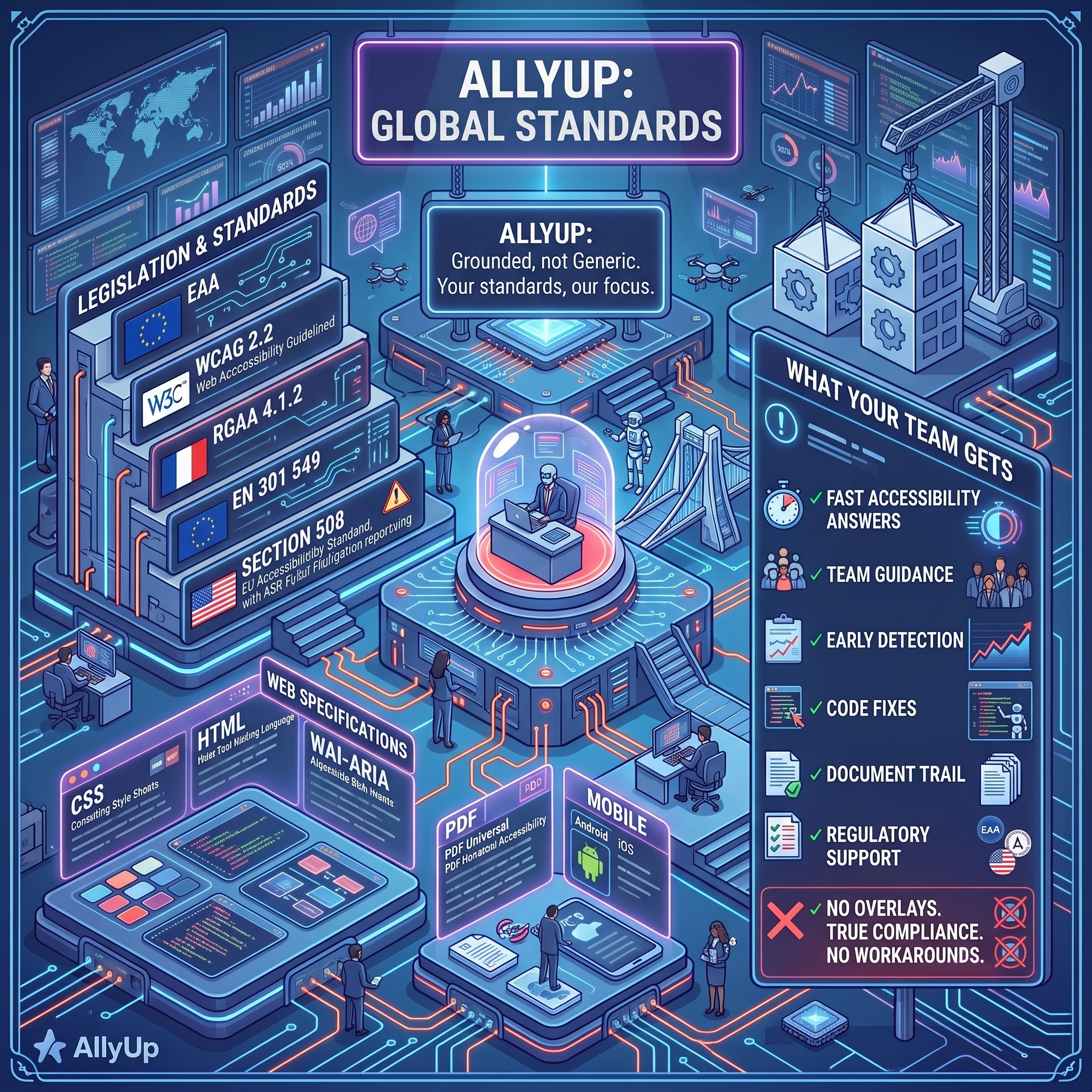
Legislation & standards
- EAAEuropean Accessibility Act, In force since June 2025, legally enforceable across the EU
- WCAG 2.2Web Content Accessibility Guidelines, Current W3C AA standard for digital accessibility
- RGAA 4.1.2Référentiel Général d'Amélioration de l'Accessibilité, French national accessibility standard, structurally aligned with WCAG 2.1
- EN 301 549EU Procurement Standard, Technical requirements for ICT products and services
- Section 508US Federal Accessibility Standard, US federal ICT accessibility standard, incorporating WCAG 2.0 AA, with ADA Title III litigation risk reporting
Web specifications
- CSSCascading Style Sheets, W3C styling specifications for accessible colour contrast, focus visibility, and motion reduction
- HTMLHyperText Markup Language, Semantic markup standard underlying all accessible, machine-readable web content
- WAI-ARIAAccessible Rich Internet Applications, W3C specification for accessible interactive components, defining roles, states, and properties for assistive technologies
- PDF/UAPDF Universal Accessibility, ISO 14289 and EN 301 549 Chapter 10 standards for tagged, accessible PDF documents covering tag structure, reading order, and screen reader compatibility
Mobile
- AndroidAndroid Accessibility, Google's accessibility framework for Android apps, covering TalkBack screen reader, focus navigation, and content description APIs
- iOSiOS / VoiceOver, Apple's accessibility APIs and VoiceOver screen reader guidelines for iOS apps, including UIAccessibility and assistive technology support
What your team gets
AllyUp is about what your team achieves every day, faster answers, fewer surprises, and products that work for the 1.3 billion people who need them.